
Weighing
Unmanned weighbridges and ERP integration
An unmanned weighbridge identifies, positions, weighs and issues the ticket without an operator, then posts to the ERP. Equipment, controls and rollout.
- Topic
- Weighing
- Updated
- 13 November 2026
- Reading time
- 4 min
- Sections
- 8
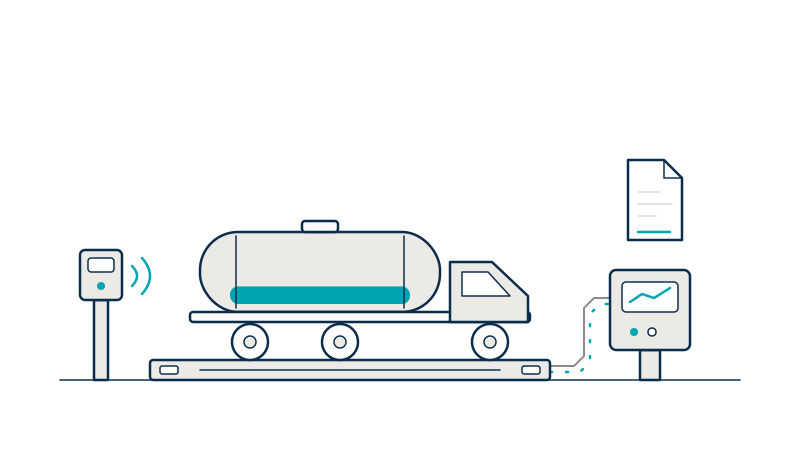
An unmanned weighbridge is a weighbridge that runs weigh-in and weigh-out without an operator in the weighbridge office: it identifies the vehicle with RFID or a camera, confirms its position with sensors, controls a barrier, and sends the result straight to the ERP.
The scale itself is the same one described in how a weighbridge works. What changes is everything around it. A person who used to look out of the window now has to be replaced by sensors, rules and records. This guide covers what the system needs, how it compares with manual and semi-automatic setups, what to send to SAP or another ERP, and how to introduce it safely.
Reasons
Why sites go unmanned, and what it costs
Sites automate the weighbridge to keep the gate moving at any hour without a person in the office.
The common reasons are night and weekend shifts, queues at the gate, and manual entry that creates retyping errors. The trade-off is that nobody is standing there to judge. Power, network and sensors become part of the weighing process, so a failed sensor or a dropped link stops trucks instead of being worked around. An unmanned design therefore needs more maintenance attention than a manned one, not less.
Equipment
What an unmanned weighbridge needs
Each job the operator did by eye needs a device or a rule.
The operator used to know the truck, see that the wheels were on the deck, notice a strange load and hand over the ticket. In an unmanned system, identification replaces recognition, sensors replace the view from the window, cameras replace memory, and server-side checks replace the habit of asking the driver.
Vehicle identification
RFID card or tag, barcode, or a camera reading the plate, tied to an open order.
Position sensing
Light curtains or sensors that show the vehicle is fully on the deck.
Camera evidence
Photos of the vehicle and plate at every weighing, stored with the transaction.
Barrier and signals
A barrier and traffic lights that open only when the transaction is valid.
Driver terminal
A display, ticket printer and intercom so the driver can act and get help.
Server-side validation
Rules for order, tare, position and duplicates, plus a queue for exceptions.
Options
Manual, semi-automatic or unmanned
Most sites move in steps rather than jumping from paper to unattended.
A manual weighbridge relies on the operator for everything. A semi-automatic one identifies and records automatically but keeps an operator who confirms. An unmanned one removes that person from the normal path and keeps a remote supervisor for exceptions. The table shows where the work moves.
| Criterion | Manual | Semi-automatic | Unmanned |
|---|---|---|---|
| Identifying the truck | Operator reads the plate and delivery note | RFID or barcode read, operator confirms | RFID, barcode or plate camera against an open order |
| Checking wheel position | Operator looks | Operator looks, sensors assist | Sensors and rules block the weighing |
| Recording the weight | Often typed or copied | Read from the indicator | Read from the indicator, no manual entry |
| Handling exceptions | Operator decides | Operator decides, system logs | Remote supervisor works an exception queue |
| Posting to ERP | Batch entry later | Per transaction after confirmation | Per transaction, automatic |
Flow
How an unmanned weighing runs
Barrier is closed; lights show stop.
Hover, focus or tap a step to read its note.Controls
Closing the gaps when nobody is watching
An unmanned weighbridge is only as honest as its rules, because there is nobody to catch what the rules miss.
Three controls carry most of the load. Position sensing stops the most common trick, a truck with a wheel or axle off the deck. Photos at both weighings tie the number to a vehicle and give a reviewer something to look at. A stored-tare check flags a tare that moved more than the site accepts. All three need a place to send the failures: an exception queue with a named supervisor and a target response time, not an alarm nobody owns.
The intercom matters as much as the sensors. A driver who is stuck on the deck at night needs a person to answer within a short, agreed time, and the system should log that call.
Integration
What goes to SAP or the ERP
The ERP needs the result of the weighing, tied to the order that started it.
The usual payload is the order or delivery note number, the vehicle, the material, gross, tare and net weight with the unit, both time stamps, the weighbridge and the ticket number. Posting per transaction keeps stock and billing current. The key is a single order number that both systems recognise, so the weighbridge software should read open orders from the ERP, or from the TAS, before the truck arrives.
Plan the failure case as well. If the ERP is unreachable, the weighbridge should queue the transaction, keep issuing tickets and replay the queue in order when the link returns.
{
  "ticketNo": "WT-000123",
  "weighbridge": "WB-01",
  "orderNo": "DO-0456789",
  "vehicleNo": "D 1234 XX",
  "material": "(product)",
  "weighIn":  { "time": "2026-11-13T07:42:00+07:00", "kg": 38460 },
  "weighOut": { "time": "2026-11-13T08:31:00+07:00", "kg": 14220 },
  "netKg": 24240,
  "photos": ["IN-0001", "OUT-0001"]
}Rollout
Rolling it out in stages
Rolling out means preparing the drivers as much as the equipment.
Drivers need clear signs in Bahasa Indonesia, good lighting, a safe place to stop and a way to speak to a person. Treat the weighbridge as a traffic and safety area and have the site's HSE team review the layout. Introduce it in stages, so the exception log shows what the rules miss before the office is empty.
From operator-assisted to unmanned
- Stage 1
Survey the gate
Check traffic flow, deck length, lighting, network, power and the legal status of the scale.
- Stage 2
Semi-automatic with an operator
Run identification, sensors, cameras and posting while the operator confirms each weighing.
- Stage 3
Review the exceptions
Read the exception log, tune the rules and train drivers before anyone leaves the office.
- Stage 4
Unmanned hours
Start with quiet shifts, keep a remote supervisor, and widen the hours as the exception rate settles.
Scope
Where Citia stands
Citia has not published an unmanned weighbridge project, and this guide does not claim one. What the website does document are the building blocks.
INTEGRA Weighing identifies the vehicle by RFID or barcode, reads the weight from the weighing controller, keeps camera evidence for each weighing, opens a barrier only for a valid transaction, and passes results to TAS, SAP or another ERP. INTEGRA Access covers vehicle access rules at the gate. Citia's long-term service work at the Panjang LPG depot, described in LTSA for LPG Panjang, shows why the communication path between weighbridge controller and PC deserves monitoring in any setup. See INTEGRA Weighing and INTEGRA Access.
Glossary
- RFID
- Radio-frequency identification: a card or tag read at a distance to identify a vehicle or person.
- ANPR
- Automatic number-plate recognition: a camera reads the plate and software turns it into text.
- Light curtain
- A row of light beams that detects an object crossing its line, used to check position.
- Exception queue
- The list of weighings that failed a rule, waiting for a supervisor to decide.
Frequently asked questions
What equipment does an unmanned weighbridge need?
An unmanned weighbridge needs vehicle identification, position sensors, cameras, a barrier with signals, a driver terminal with ticket printer and intercom, and software that validates every weighing. The scale and indicator are the same as on a manned weighbridge.
How do you stop trucks from not fully entering the deck?
Use position sensors such as light curtains, a deck long enough for the longest vehicle, and a rule that blocks the weighing while a sensor is blocked. Camera photos then give a reviewer proof of where the truck stood.
What data is sent to SAP from a weighbridge?
The weighbridge sends the order number, vehicle, material, gross, tare and net weight, both time stamps, the weighbridge and the ticket number. It should post per transaction against an order that already exists in SAP or the TAS.
Is an unmanned weighbridge allowed under legal metrology rules?
The scale must still carry a valid tera mark, and OIML R 76-1 lists self-service among the modes an instrument may have. Whether your configuration is acceptable depends on the instrument's approval and local practice, so confirm it with your regional Unit Metrologi Legal first.
What happens when the ERP or network is down?
The weighbridge should keep weighing and issue tickets, queue the transactions locally, and send them in order when the link returns. Design this case first, because an unmanned site cannot fall back on a person typing the weight.
Sources and further reading
- OIML R 76-1 (2006): Non-automatic weighing instruments, Part 1 (clause 4.20, modes of operation) (opens in a new tab)
- Peraturan Menteri Perdagangan Nomor 24 Tahun 2024 tentang Kegiatan Tera dan Tera Ulang (opens in a new tab)
- INTEGRA Weighing (opens in a new tab)
- INTEGRA Access (opens in a new tab)
- LTSA for LPG Panjang (opens in a new tab)
Next step
Prepare the technical discussion for your facility.
Bring the equipment list, diagrams and symptoms you have. The Citia team helps map the next step.
Related products and solutions
- KnowledgeElectronic seals and fleet data: protecting fuel from terminal to stationAn electronic seal records every opening of a tank-truck compartment with time and location. See how seals and fleet data work together from terminal to station and how to respond to an alert.
- KnowledgeTPS Online (Indonesian Customs): what it is, who must report and how it worksTPS Online is the electronic data exchange between customs and a temporary storage (TPS) operator for goods entering and leaving. Learn who must connect, what is reported and what to do when a response is unclear.
- ProductINTEGRA WeighingPairs weigh-in and weigh-out for each truck and issues the weigh ticket.
- ProductINTEGRA AccessControls who and which vehicles may enter each area, and keeps a full entry and exit record.
- KnowledgeHow a weighbridge works: weigh tickets, verification and integrationA weighbridge weighs a whole truck on load cells and records gross, tare and net weight on a ticket. Components, tickets, tera ulang and cheating controls.
- KnowledgeLegal metrology in Indonesia: verification (tera), re-verification and calibrationTera marks an instrument as valid for use, tera ulang repeats it periodically, and calibration gives no legal status. The rules and the process in Indonesia.
- ProjectLTSA for LPG PanjangThe long-term service agreement (LTSA) for the TAS at LPG Panjang keeps the Terminal Automation System (TAS) reliable and available. The TAS supports LPG receipt, storage and distribution.